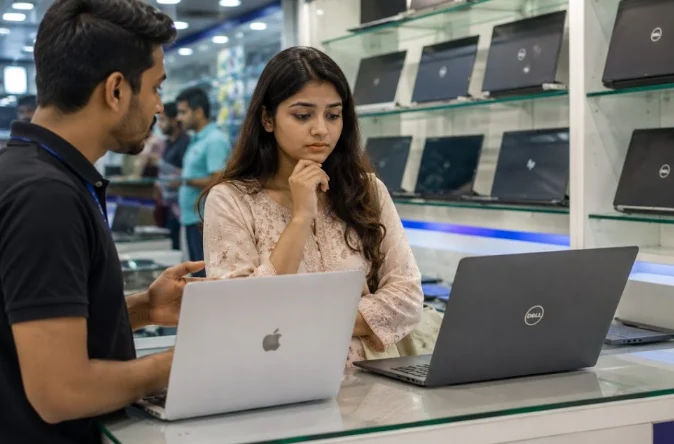
A MacBook wins on battery life, build quality, and performance for creative and professional work.
A traditional Windows laptop wins on price, gaming, software flexibility, and hardware upgradability. The right choice depends entirely on what you do every day, not on which brand is more popular.
MacBooks powered by Apple’s M-series chips last 15 to 22 hours on a charge and handle video editing, coding, and design tasks without the fans ever turning loud.
Traditional laptops running Windows offer far more price range, more gaming support, and a wider software ecosystem.
For Bangladesh buyers exploring Apple MacBook for work and creativity, the decision often comes down to one very important question.
Do you work inside Apple’s ecosystem, or do you need the flexibility that Windows provides?
Where a MacBook Wins
The MacBook’s biggest advantage is its chip. Apple’s M-series processors from M3 to M5 deliver more performance per watt than anything from Intel or AMD at a comparable power level.
That translates to the laptop staying cool and quiet even under heavy work, and the battery genuinely lasts a full workday.
- Battery life: MacBook Air M3 averages 15 to 18 hours of real-world use. MacBook Pro M5 claims up to 24 hours. Most Windows laptops at the same price deliver 5 to 8 hours under normal use.
- Build quality: Every MacBook ships in a machined aluminum body with no flex, no creak, and a trackpad that sets the standard every Windows laptop competes against.
- Video and audio creation: Final Cut Pro, Logic Pro, and DaVinci Resolve run natively on Apple Silicon with GPU acceleration that makes 4K editing smooth even on the base M3 chip.
- Longevity: MacBooks bought in 2019 still run current macOS updates. A five-year-old Windows laptop often cannot keep up with newer software demands the same way.
For freelancers, designers, and developers in Bangladesh who live inside their laptop for 8 or more hours a day, these advantages compound.
Longer battery means no hunting for outlets in cafes or client offices. Quiet operation means no fan noise on video calls. Native app performance means faster exports and shorter render waits.
Where Traditional Laptops Win
Windows laptops offer hardware flexibility, component upgradability, and full software compatibility that MacBooks cannot match.
- Gaming: Windows supports the complete library of AAA games and esports titles, whereas macOS compatibility remains limited to a fraction of titles.
- Price Entry Points: Functional Windows laptops start at BDT 30,000, compared to MacBooks starting at BDT 150,000, making Windows far more accessible for Bangladeshi students.
- Software Compatibility: Enterprise tools, ERP systems, and educational platforms default to Windows, avoiding the need for software workarounds required on macOS.
- Hardware Upgradability: Most mid-range Windows laptops allow RAM and SSD upgrades, extending the machine’s useful life without requiring a full system replacement.
For students, gamers, and corporate professionals in Bangladesh, a traditional Windows laptop remains the most practical and budget-friendly choice.
MacBook vs Traditional Laptop: Side-by-Side
Use this table to compare both options across every factor that matters for Bangladesh buyers.
| Factor | MacBook (M-series) | Traditional Windows Laptop |
| Chip | Apple M3 to M5, unified memory | Intel Core or AMD Ryzen |
| Battery life | 15 to 22 hours real-world | 4 to 10 hours depending on load |
| Performance per watt | Best in class | Competitive but power-hungry |
| Gaming | Limited title selection | Wide AAA game support |
| Software ecosystem | macOS only | Windows, Linux, all apps |
| RAM upgradeable | Soldered, no upgrade | Upgradeable on most models |
| Build quality | Aluminum, premium feel | Varies widely by brand |
| Price (Bangladesh) | ৳1,50,000 and above | ৳30,000 to ৳1,50,000 |
| After-sales support | Authorized service centers | Brand-dependent service access |
| Best for | Creators, developers, professionals | Students, gamers, general users |
Who Should Actually Buy Which?
Stop focusing on which laptop is objectively better; choose the machine that aligns with your daily workflow.
Buy a MacBook If You:
- Create Content: Edit photo, video, or audio projects as your primary work.
- Develop Software: Prefer a stable, Unix-based environment with strong native terminal support.
- Use Apple Devices: Want seamless Handoff, AirDrop, and iCloud integration with your iPhone.
- Need Portability: Require reliable, all-day battery life to work on the go without a charger.
- Want Long-Term Value: Can invest more upfront for high resale value and a $5\text{+ year}$ operational life.
Buy a Windows Laptop If You:
- Game Regularly: Need full access to the complete PC gaming library without software workarounds.
- Have a Moderate Budget: Are a student in Bangladesh working with a budget under BDT 60,000.
- Require Windows Software: Depend on enterprise tools, government portals, or legacy software.
- Value Upgradability: Want the freedom to replace or upgrade RAM and SSD storage later.
- Need Specific GPUs: Require dedicated graphics hardware for 3D rendering, machine learning, or high-end gaming.
What About the Price Gap?
The price of a MacBook covers chip efficiency, battery life, build quality, and end-to-end software optimization.
A MacBook Air M3 at BDT 155,000 competes against Windows laptops in the BDT 70,000 to BDT 90,000 range in raw creative processing speed while providing double the battery life.
However, not every buyer in Bangladesh requires those specific advantages. A student focusing on lectures, assignments, and video streaming gets complete functionality from a Windows laptop at BDT 45,000 to BDT 60,000.
Conversely, a professional video editor saves time on exports, justifying the MacBook premium within the first year of client work.
The goal is to determine which laptop offers value for your specific workflow. Browse the full range of current models and official warranty options at EERNA to compare both ecosystems.
